
Azure DevOps for SQL Server DBAs. Part 3 – Continuous Delivery of SQL Agent Jobs
In this final post of the DBAs DevOps series, I would like to talk about the remaining piece of the puzzle – delivery of SQL Agent jobs using the pipeline. I will discuss various approaches that can be used and then perform a test drive of the metadata-driven way of delivering the jobs.
Prerequisites
- An Azure DevOps project. It is used through the series of related posts as the container for the source code and deployment pipelines.
- Because this is the last post of the “DBA DevOps series”, it depends on the dba-db database project and deployment pipeline created earlier.
Why SQL Agent jobs should be also included in the DBA’s database project?
In the previous two posts, I’ve shown how DBA teams can use Azure DevOps to create deployment pipelines and Azure Data Studio to maintain database projects. These tools can work together to consistently deliver the maintenance code to the on-premises SQL Server estates. However, bringing tables, views and stored procedures is only part of the story of the automation for DBAs. Those objects mostly rely on SQL Agent jobs as the scheduling service.
Therefore, it would be beneficial to have a pipeline that delivers not just stored procedures and tables but SQL Agent jobs.
Another reason is that “one-time-delivery” of the jobs is not enough. Jobs by themselves also need to be updated time-to-time. Think of changes in job steps, job categories, job notification settings, etc. The pipeline can take care of all that as well.
Some real-life cases where automated delivery of SQL Agent jobs can help:
- Creation and decommission of the jobs
- Addition of the new step in the existing job
- Change the “retry_attempts” and “retry_interval” settings of the job steps
- Change of the parameters in the maintenance procedures
- Change the jobs logging output location and notification settings
If the number of instances is very low, perhaps investment into the automation could be overkilling. However, if the count is measured in hundreds or thousands, pushing jobs changes to the entire estate by the pipeline can take minutes instead of days.
Metadata-generated jobs instead of pre-baked scripts
The other aspect to consider is the way how jobs can be delivered. The default and perhaps the simplest option is merely placing job scripts “as-is” into the dacpac and run them by the “Post-Deployment Script”.
The advantage of such an approach is that the job script acts as the monolithic single unit of delivery. This brings benefits:
- It is easy to add such scripts to the database project
- Easy maintenance in a Git, in the end, it is just a job script generated by SSMS (or another tool that uses SMO)

However, this approach has also disadvantages. Because scripts are monolithic units of delivery, re-deployment options of such jobs are limited:
- Redeployment of the job means its deletion and re-creation with some negative effects:
- All customizations, like adjusted job schedules, will be lost during the re-creation
- The job execution history will also be lost due to re-creation
These limitations can be blockers, especially if some jobs are customized requested by requests of the end-users.
A declarative way of jobs delivery
Declarative delivery of jobs is another approach. The idea behind it is that the pipeline delivers records with metadata of what we expect to see on the database server. So, instead of pre-baked scripts with direct instructions of how prescribed jobs should be created, the pipeline delivers only the list of jobs and job steps. Then, the post-deployment script triggers the deployment procedure to bring the instance to a “desired state”. Logically, this method works this way:

The dacpac firstly synchronizes metadata tables and then it triggers the procedure usp_jobs_DeployJob. The procedure iterates through each record and brings the instance to the desired state:

The deployment process depends on the deployment mode of a particular job and the current state of the target instance.
Deployment modes
There are four deployment modes, that can be suitable for various circumstances and requirements:
- CreateOnly – If a job is missing, it will be created. But if it already exists, the pipeline will not perform any actions.
- CreateUpdate – If a job is missing it will be created and if it already exists, it will be updated (default mode).
- ReCreate – If a job exists it will be firstly dropped and then re-created. If a job is missing, it will be created. This mode can be helpful to “reset” the state and override preserved state like job schedules.
- Drop – If a job exists it will be dropped.
What is preserved during the deployment?
By default, the pipeline preserves schedules and execution history of the involved jobs. However, these artifacts will be still if the job deployment mode is set to “ReCreate” or “Drop”.
Changing the database project
Let’s now move from a theoretical to a practical part. In the first post of the series, I created a database project. That project will be further extended by:
- Placing metadata and deployment logic – tables and stored procedures
- Placing post-deployment scripts that will trigger delivery of the jobs
- Adjusting the database project file to instruct the database project about the presence of the post-deployment scripts
Step 1. Placing metadata and deployment objects to the database project:
In this step I’ll create necessary database objects into the model by placing them in the dbo folder:
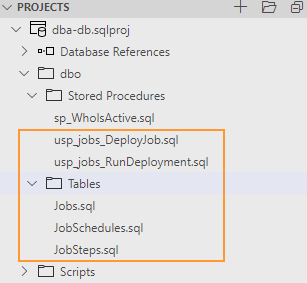
Table 1: dbo.Jobs:
Contains a job level metadata:
CREATE TABLE [dbo].[Jobs](
	[name] [sysname] NOT NULL,
	[description] [nvarchar](2000) NULL,
	[category_name] [nvarchar](200) NULL,
	[deployment_mode] [varchar](50) NOT NULL
) ON [PRIMARY]
GO
ALTER TABLE dbo.Jobs ADD CONSTRAINT PK_Jobs PRIMARY KEY ([name])
Table 2: dbo.JobSteps:
Contains metadata about job steps.
CREATE TABLE [dbo].[JobSteps](
	[job_name] [sysname] NOT NULL,
	[step_name] [sysname] NOT NULL,
	[step_id] [int] NOT NULL,
	[cmdexec_success_code] [int] NOT NULL,
	[on_success_action] [int] NOT NULL,
	[on_success_step_id] [int] NOT NULL,
	[on_fail_action] [int] NOT NULL,
	[on_fail_step_id] [int] NOT NULL,
	[retry_attempts] [int] NOT NULL,
	[retry_interval] [int] NOT NULL,
	[subsystem] [nvarchar](40) NOT NULL,
	[command] [nvarchar](max) NOT NULL,
	[database_name] [sysname] NOT NULL
) ON [PRIMARY]
GO
ALTER TABLE dbo.JobSteps ADD CONSTRAINT PK_JobSteps PRIMARY KEY (job_name, step_id)
Table 3: dbo.JobSchedules:
Contains job schedules that will be used during the initial job creation.
CREATE TABLE [dbo].[JobSchedules](
	[job_name] [sysname] NOT NULL,
	[schedule_name] [sysname] NOT NULL,
	[schedule_enabled] [int] NOT NULL,
	[freq_type] [int] NOT NULL,
	[freq_interval] [int] NOT NULL,
	[freq_subday_type] [int] NOT NULL,
	[freq_subday_interval] [int] NOT NULL,
	[freq_relative_interval] [int] NOT NULL,
	[freq_recurrence_factor] [int] NOT NULL,
	[active_start_date] [int] NOT NULL,
	[active_end_date] [int] NOT NULL,
	[active_start_time] [int] NOT NULL,
	[active_end_time] [int] NOT NULL
) ON [PRIMARY]
GO
ALTER TABLE dbo.JobSchedules ADD CONSTRAINT PK_JobShedules PRIMARY KEY ([job_name], schedule_name)
Stored procedure 1: dbo.usp_job_RunDeployment:
The primary deployment procedure. It fetches the list of jobs to process and run the child procedure dbo.usp_jobs_DeployJob for each line to perform the delivery of the job.
CREATE PROC dbo.usp_jobs_RunDeployment
AS
DECLARE @Deployment_JobName sysname
DECLARE @Deployment_Mode varchar(50)
DECLARE @Deployment_JobExists bit


PRINT 'Starting job deployment'

DECLARE CT_DeployJobs CURSOR FOR
SELECT
	j.[name] as JobName
,	j.deployment_mode as JobDeploymentMode
FROM dbo.Jobs j


OPEN CT_DeployJobs

FETCH NEXT FROM CT_DeployJobs INTO @Deployment_JobName, @Deployment_Mode
WHILE @@FETCH_STATUS = 0
BEGIN

		EXEC dbo.usp_jobs_DeployJob @Deployment_JobName


FETCH NEXT FROM CT_DeployJobs INTO @Deployment_JobName, @Deployment_Mode
END

CLOSE CT_DeployJobs
DEALLOCATE CT_DeployJobs
Stored procedure 2: dbo.usp_jobs_DeployJob:
This procedure performs the real work, depends on the deployment mode it creates, recreates, updates or deletes the job specified by @Job_Name.
CREATE PROCEDURE [dbo].[usp_jobs_DeployJob]
@Job_Name sysname
AS
SET NOCOUNT ON

-- Procedure level variables
DECLARE @PRC_job_exists bit
DECLARE @PRC_job_deployment_mode varchar(50)


-- Job level variables:
DECLARE @jobId BINARY(16)
DECLARE @Job_description nvarchar(2000)
DECLARE @Job_category_name nvarchar(4000)
DECLARE @Job_owner_login_name sysname


-- Job step level variables:
DECLARE @JobStep_step_id INT
DECLARE @JobStep_step_name sysname
DECLARE @JobStep_cmdexec_success_code int
DECLARE @JobStep_on_success_action int
DECLARE @JobStep_on_success_step_id int
DECLARE @JobStep_on_fail_action int
DECLARE @JobStep_on_fail_step_id int
DECLARE @JobStep_retry_attempts int
DECLARE @JobStep_retry_interval int
DECLARE @JobStep_subsystem nvarchar(40)
DECLARE @JobStep_command nvarchar(max)
DECLARE @JobStep_database_name sysname


-- Job Schedule level variables:
DECLARE @JobSchedule_Type varchar(50)
DECLARE @JobSchedule_name sysname
DECLARE @JobSchedule_enabled bit
DECLARE @JobSchedule_freq_type int
DECLARE @JobSchedule_freq_interval int
DECLARE @JobSchedule_freq_subday_type int
DECLARE @JobSchedule_freq_subday_interval int
DECLARE @JobSchedule_freq_relative_interval int
DECLARE @JobSchedule_freq_recurrence_factor int
DECLARE @JobSchedule_active_start_date int
DECLARE @JobSchedule_active_end_date int
DECLARE @JobSchedule_active_start_time int
DECLARE @JobSchedule_active_end_time int

-- Starting transactional deployment
SET XACT_ABORT ON
BEGIN TRAN

BEGIN TRY

-- Phase 1: creating job

-- Step 1.1: Check if job already exists on the server and if job definitions exists in metadata

IF EXISTS (
	SELECT * FROM msdb.dbo.sysjobs WHERE [name] = @Job_Name
)
	SET @PRC_job_exists = 1
ELSE
	SET @PRC_job_exists = 0


IF NOT EXISTS (
	SELECT * FROM dbo.Jobs WHERE [name] = @Job_Name
)
BEGIN
	PRINT CONCAT('Metadata for job "',@Job_Name,'" does not exists, terminating the execution of [dbo].[usp_jobs_DeployJob]')
	RETURN
END


-- Step 1.2: Retreive job level metadata

SELECT
	@Job_description = [description]
,	@Job_category_name = category_name
,	@Job_owner_login_name = SUSER_SNAME(0x1)
,	@PRC_job_deployment_mode = deployment_mode
FROM dbo.Jobs
WHERE [name] = @Job_Name


-- Step 1.3: Create Job Category if missing
IF NOT EXISTS (SELECT name FROM msdb.dbo.syscategories WHERE name=@Job_category_name AND category_class=1)
	EXEC msdb.dbo.sp_add_category @class=N'JOB', @type=N'LOCAL', @name=@Job_category_name


-- Step 1.4: Remove existing job if required
IF (@PRC_job_exists = 1 AND @PRC_job_deployment_mode IN ( 'Drop', 'ReCreate') )
BEGIN
	PRINT CONCAT('[',@Job_Name,']: Removing the job')

	EXEC msdb.dbo.sp_delete_job  @job_name = @Job_Name;
END

-- Step 1.5: Create/Update job
IF ((@PRC_job_exists = 0 AND @PRC_job_deployment_mode IN ('CreateUpdate', 'CreateOnly') ) OR  @PRC_job_deployment_mode IN ('ReCreate') )
BEGIN
    PRINT CONCAT('[',@Job_Name,']: Creating the job')
	EXEC    msdb.dbo.sp_add_job
			@job_name= @Job_Name,
			@description=@Job_description,
			@category_name=@Job_category_name,
			@owner_login_name=@Job_owner_login_name,
			@job_id = @jobId OUTPUT

	EXEC    msdb.dbo.sp_add_jobserver @job_name = @Job_Name, @server_name = N'(local)'

END

ELSE IF(@PRC_job_exists = 1 AND @PRC_job_deployment_mode IN ('CreateUpdate') )
BEGIN
    PRINT CONCAT('[',@Job_Name,']: Updating the job')
	EXEC    msdb.dbo.sp_update_job
			@job_name= @Job_Name,
			@description=@Job_description,
			@category_name=@Job_category_name

END

ELSE IF (@PRC_job_exists = 1 AND @PRC_job_deployment_mode IN ( 'CreateOnly') )
BEGIN
PRINT CONCAT('[',@Job_Name,']: job already exists. Deployment mode is "CreateOnly", terminating the execution of [dbo].[usp_jobs_DeployJob]')
END
ELSE IF (@PRC_job_exists = 0 AND @PRC_job_deployment_mode IN ( 'Drop') )
BEGIN
	PRINT CONCAT('[',@Job_Name,']: Job doesn''t exists, terminating the execution of [dbo].[usp_jobs_DeployJob]')
END


-- Phase 2: Job steps:

IF (@PRC_job_deployment_mode IN ('CreateUpdate', 'ReCreate') OR (@PRC_job_deployment_mode IN ('CreateOnly') AND @PRC_job_exists = 0 ) )
BEGIN


	-- Step 2.1: Clean existing job steps:
	DECLARE ct_JobSteps CURSOR FOR
	SELECT js.step_id FROM msdb.dbo.sysjobsteps js
	JOIN msdb.dbo.sysjobs j on js.job_id = j.job_id
	WHERE j.name = @Job_Name
	order by js.step_id DESC

	OPEN ct_JobSteps

	FETCH NEXT FROM ct_JobSteps into @JobStep_step_id

	WHILE @@FETCH_STATUS = 0
	BEGIN

		EXEC msdb.dbo.sp_delete_jobstep @job_name=@Job_Name, @step_id=@JobStep_step_id

		FETCH NEXT FROM ct_JobSteps into @JobStep_step_id
	END

	CLOSE ct_JobSteps
	DEALLOCATE ct_JobSteps


	-- Step 2.2: Re-create job steps:

	DECLARE ct_JobSteps CURSOR FOR
	SELECT
			[step_name]
	,		[step_id]
	,		[cmdexec_success_code]
	,		[on_success_action]
	,		[on_success_step_id]
	,		[on_fail_action]
	,		[on_fail_step_id]
	,		[retry_attempts]
	,		[retry_interval]
	,		[subsystem]
	,		[command]
	,		[database_name]
	FROM dbo.JobSteps
	WHERE [job_name] = @Job_Name
	ORDER BY [step_id]

	OPEN ct_JobSteps

	FETCH NEXT FROM ct_JobSteps INTO
		@JobStep_step_name
	,	@JobStep_step_id
	,	@JobStep_cmdexec_success_code
	,	@JobStep_on_success_action
	,	@JobStep_on_success_step_id
	,	@JobStep_on_fail_action
	,	@JobStep_on_fail_step_id
	,	@JobStep_retry_attempts
	,	@JobStep_retry_interval
	,	@JobStep_subsystem
	,	@JobStep_command
	,	@JobStep_database_name


	WHILE @@FETCH_STATUS = 0
	BEGIN

		PRINT CONCAT('[',@Job_Name,']: Adding job step "',@JobStep_step_name, '"')

		EXEC    msdb.dbo.sp_add_jobstep
				@job_name=@Job_Name,
				@step_name=@JobStep_step_name,
				@step_id=@JobStep_step_id,
				@cmdexec_success_code=@JobStep_cmdexec_success_code,
				@on_success_action=@JobStep_on_success_action,
				@on_success_step_id=@JobStep_on_success_step_id,
				@on_fail_action=@JobStep_on_fail_action,
				@on_fail_step_id=@JobStep_on_fail_step_id,
				@retry_attempts=@JobStep_retry_attempts,
				@retry_interval=@JobStep_retry_interval,
				@subsystem=@JobStep_subsystem,
				@command=@JobStep_command,
				@database_name=@JobStep_database_name


		FETCH NEXT FROM ct_JobSteps INTO
			@JobStep_step_name
		,	@JobStep_step_id
		,	@JobStep_cmdexec_success_code
		,	@JobStep_on_success_action
		,	@JobStep_on_success_step_id
		,	@JobStep_on_fail_action
		,	@JobStep_on_fail_step_id
		,	@JobStep_retry_attempts
		,	@JobStep_retry_interval
		,	@JobStep_subsystem
		,	@JobStep_command
		,	@JobStep_database_name

	END

	CLOSE ct_JobSteps
	DEALLOCATE ct_JobSteps

END

    -- Phase 3: Schedules

IF (@PRC_job_deployment_mode IN ('ReCreate') OR (@PRC_job_deployment_mode IN ('CreateOnly', 'CreateUpdate') AND @PRC_job_exists = 0 ) )
BEGIN

	-- Step 3.1: Create job schedules

	DECLARE ct_JobSchedules CURSOR FOR
		SELECT
			[schedule_name]
		,	[schedule_enabled]
		,	[freq_type]
		,	[freq_interval]
		,	[freq_subday_type]
		,	[freq_subday_interval]
		,	[freq_relative_interval]
		,	[freq_recurrence_factor]
		,	[active_start_date]
		,	[active_end_date]
		,	[active_start_time]
		,	[active_end_time]
		FROM dbo.JobSchedules
		WHERE [job_name] = @job_name


	OPEN ct_JobSchedules

	FETCH NEXT FROM ct_JobSchedules
	INTO	@JobSchedule_name
	,		@JobSchedule_enabled
	,		@JobSchedule_freq_type
	,		@JobSchedule_freq_interval
	,		@JobSchedule_freq_subday_type
	,		@JobSchedule_freq_subday_interval
	,		@JobSchedule_freq_relative_interval
	,		@JobSchedule_freq_recurrence_factor
	,		@JobSchedule_active_start_date
	,		@JobSchedule_active_end_date
	,		@JobSchedule_active_start_time
	,		@JobSchedule_active_end_time

	WHILE @@FETCH_STATUS = 0
	BEGIN

		IF EXISTS (
			SELECT * FROM msdb.dbo.sysschedules ss
			JOIN msdb.dbo.sysjobschedules sjs ON ss.schedule_id = sjs.schedule_id
			JOIN msdb.dbo.sysjobs sj ON sjs.job_id = sj.job_id
			WHERE sj.name = @Job_Name
				AND ss.name = @JobSchedule_name
		)
		BEGIN
			PRINT CONCAT('[',@Job_Name,']: Schedule "',@JobSchedule_name, '" already exists')

		END
		ELSE
		BEGIN

			PRINT CONCAT('[',@Job_Name,']: Creating a ',lower(@JobSchedule_Type),' schedule "',@JobSchedule_name, '"')

			EXEC msdb.dbo.sp_add_jobschedule
				@job_name = @Job_Name,
				@name=@JobSchedule_name,
				@enabled=@JobSchedule_enabled,
				@freq_type=@JobSchedule_freq_type,
				@freq_interval=@JobSchedule_freq_interval,
				@freq_subday_type=@JobSchedule_freq_subday_type,
				@freq_subday_interval=@JobSchedule_freq_subday_interval,
				@freq_relative_interval=@JobSchedule_freq_relative_interval,
				@freq_recurrence_factor=@JobSchedule_freq_recurrence_factor,
				@active_start_date=@JobSchedule_active_start_date,
				@active_end_date=@JobSchedule_active_end_date,
				@active_start_time=@JobSchedule_active_start_time,
				@active_end_time=@JobSchedule_active_end_time

		END
		FETCH NEXT FROM ct_JobSchedules
		INTO	@JobSchedule_name
		,		@JobSchedule_enabled
		,		@JobSchedule_freq_type
		,		@JobSchedule_freq_interval
		,		@JobSchedule_freq_subday_type
		,		@JobSchedule_freq_subday_interval
		,		@JobSchedule_freq_relative_interval
		,		@JobSchedule_freq_recurrence_factor
		,		@JobSchedule_active_start_date
		,		@JobSchedule_active_end_date
		,		@JobSchedule_active_start_time
		,		@JobSchedule_active_end_time
	END

	CLOSE ct_JobSchedules
	DEALLOCATE ct_JobSchedules

END


END TRY
BEGIN CATCH

	THROW;
	IF @@TRANCOUNT > 0
	ROLLBACK TRAN


END CATCH

COMMIT TRAN
Step 2. “Post-Deployment” scripts
In the previous step, I’ve updated the database model. It does not contain any data yet. For the data population, I will use post-deployment scripts. These scripts will not just deliver metadata, but also trigger the deployment stored procedure as the final step.
Such scripts conventionally have to be placed separately from the regular database objects, because they will not be built as part of the database model:
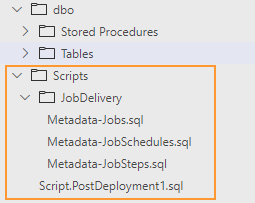
To start, right-click on the folder Scripts and choose “Add Post-Deployment Script”. Then paste into the file lines from the snipped below.
Post-Deployment script: Scripts/Script.PostDeployment1.sql
This script has SQLCMD mode syntax and it firstly runs three metadata reload scripts and then executes a stored procedure dbo.usp_jobs_RunDeployment:
-- Load jobs metadata
:r .\JobDelivery\Metadata-Jobs.sql
:r .\JobDelivery\Metadata-JobSteps.sql
:r .\JobDelivery\Metadata-JobSchedules.sql

-- Trigger deployment of jobs
EXEC dbo.usp_jobs_RunDeployment
Job level metadata: Scripts/JobDelivery/Metadata-Jobs.sql
This script and two another reload jobs-related metadata on every server where this dacpac will be deployed.
TRUNCATE TABLE dbo.Jobs

INSERT INTO dbo.Jobs (
	[name]
,	[category_name]
,	[description]
,	[deployment_mode]
)
-- Job: dba - cycle errorlog'
SELECT
	N'dba - cycle errorlog' AS [name]
,	N'DBA Jobs' AS [category_name]
,	N'Closes and cycles the current error log file by running [sp_cycle_errorlog]' AS [description]
,   'CreateUpdate' as [deployment_mode]

UNION ALL

-- Job: dba - clean backup history'
SELECT
	N'dba - clean backup history' AS [name]
,	N'DBA Jobs' AS [category_name]
,	N'Reduces the size of the backup and restore history tables by running [sp_cycle_errorlog]' AS [description]
,   'CreateUpdate' as [deployment_mode]
Job steps metadata: Scripts/JobDelivery/Metadata-JobSteps.sql
TRUNCATE TABLE dbo.JobSteps

INSERT INTO dbo.JobSteps
(
    [job_name]
,   [step_name]
,   [step_id]
,   [cmdexec_success_code]
,   [on_success_action]
,   [on_success_step_id]
,   [on_fail_action]
,   [on_fail_step_id]
,   [retry_attempts]
,   [retry_interval]
,   [subsystem]
,   [command]
,   [database_name]
)

SELECT
	N'dba - cycle errorlog' AS [job_name]
,	N'dba - cycle errorlog: run stored procedure [sp_cycle_errorlog]' AS [step_name]
,	1 AS [step_id]
,	0 AS [cmdexec_success_code]
,	1 AS [on_success_action]
,	0 AS [on_success_step_id]
,	2 AS [on_fail_action]
,	0 AS [on_fail_step_id]
,	0 AS [retry_attempts]
,	0 AS [retry_interval]
,	N'TSQL' AS [subsystem]
,	N'EXEC sp_cycle_errorlog;' AS [command]
,	N'master' AS [database_name]

UNION ALL

SELECT
	N'dba - clean backup history' AS [job_name]
,	N'dba - clean backup history: run stored procedure [sp_delete_backuphistory]' AS [step_name]
,	1 AS [step_id]
,	0 AS [cmdexec_success_code]
,	1 AS [on_success_action]
,	0 AS [on_success_step_id]
,	2 AS [on_fail_action]
,	0 AS [on_fail_step_id]
,	0 AS [retry_attempts]
,	0 AS [retry_interval]
,	N'TSQL' AS [subsystem]
,	N'declare @oldest DATETIME  = Getdate()-30;
exec sp_delete_backuphistory @oldest_date=@oldest;' AS [command]
,	N'msdb' AS [database_name]
Job schedules metadata: Scripts/JobDelivery/Metadata-JobSchedules.sql
-- Load job level metadata
TRUNCATE TABLE dbo.JobSchedules

INSERT INTO [dbo].[JobSchedules]
(
	[job_name]
,	[schedule_name]
,	[schedule_enabled]
,	[freq_type]
,	[freq_interval]
,	[freq_subday_type]
,	[freq_subday_interval]
,	[freq_relative_interval]
,	[freq_recurrence_factor]
,	[active_start_date]
,	[active_end_date]
,	[active_start_time]
,	[active_end_time]
)

-- Job: dba - cycle errorlog
SELECT
    'dba - cycle errorlog' as [job_name]
,	'Daily @ 20:00' as [schedule_name]
,	1 as [schedule_enabled]
,	4 as [freq_type]
,	1 as [freq_interval]
,	1 as [freq_subday_type]
,	0 as [freq_subday_interval]
,	0 as [freq_relative_interval]
,	0 as [freq_recurrence_factor]
,	20100101 as [active_start_date]
,	99991231 as [active_end_date]
,	200000 as [active_start_time]
,	235959 as [active_end_time]

UNION ALL

-- Job: dba - clean backup history
SELECT
    'dba - clean backup history' as [job_name]
,	'Daily @ 21:00' as [schedule_name]
,	1 as [schedule_enabled]
,	4 as [freq_type]
,	1 as [freq_interval]
,	1 as [freq_subday_type]
,	0 as [freq_subday_interval]
,	0 as [freq_relative_interval]
,	0 as [freq_recurrence_factor]
,	20100101 as [active_start_date]
,	99991231 as [active_end_date]
,	210000 as [active_start_time]
,	235959 as [active_end_time]
Step 3. Adjustments in dba-db.sqlproj
The final step is to apply a small adjustment to the database project file. For the metadata delivery scripts, I have to change the tag from <Buid /> to <None />. This is needed to instruct the dacpac compiler to not include such scripts into the build of the database model but rather embed them “as is” for further use.
...
<None Include="Scripts\JobDelivery\Metadata-Jobs.sql"/>
<None Include="Scripts\JobDelivery\Metadata-JobSteps.sql"/>
<None Include="Scripts\JobDelivery\Metadata-JobSchedules.sql"/>
...
Because the procedure usp_jobs_DeployJob calls other msdb procedures it is handy to suppress “unresolved reference to an object” warnings:
<Build Include="dbo\Stored Procedures\usp_jobs_DeployJob.sql" >
   <SuppressTSqlWarnings>71562</SuppressTSqlWarnings>
</Build>
Testing the delivery
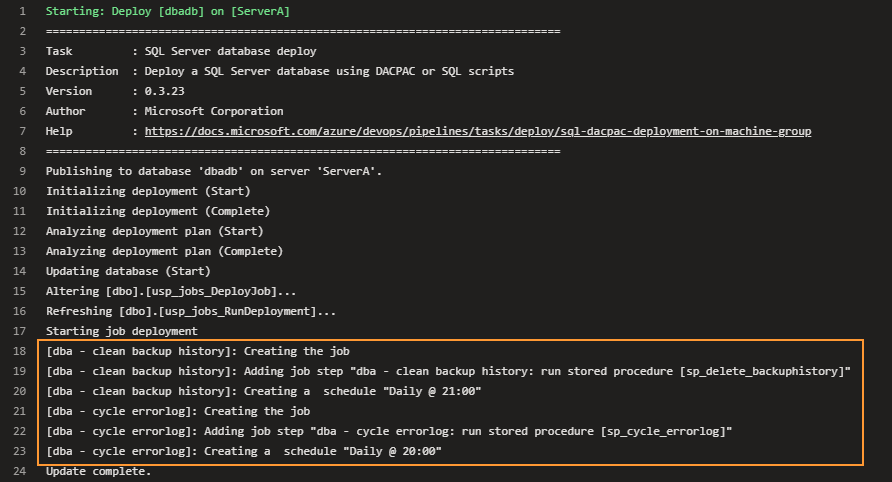
Now it is time to see the delivery in action. The code push to the repository triggers the pipeline logging of the deployment stage shows that two new jobs are created:
SSMS also shows that jobs are created in the desired category and with the right schedule. These jobs never ran yet:

Modification of the jobs
Let’s simulate the processing of job modification requests. We have two new requirements:
- Job
dba - cleanup backup historymust be decommissioned - In a job
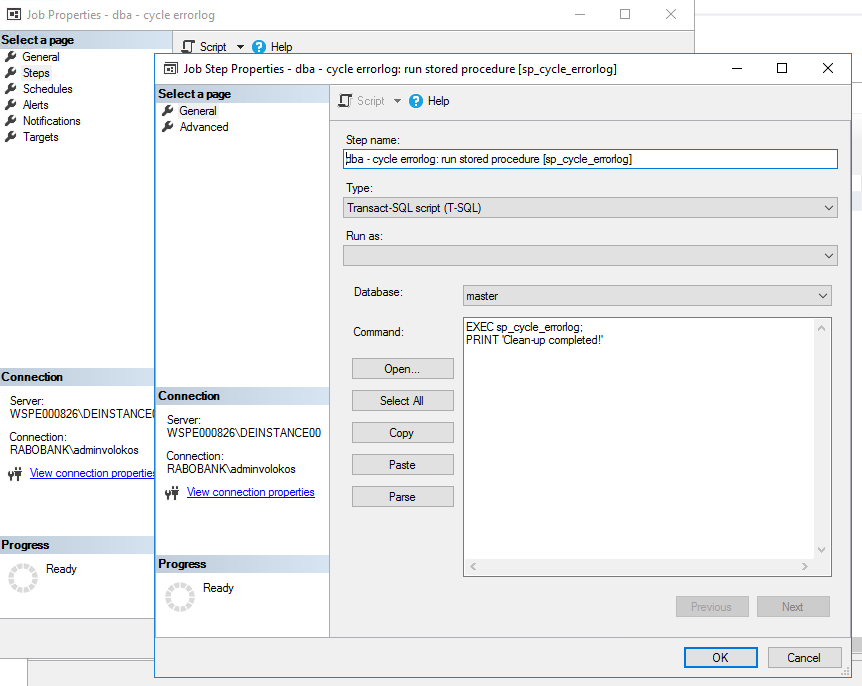
dba - dba - cycle errorlogwe have to change the existing job step by adding an extraPRINTstatement
For the first requirement, we need to change the deployment mode of the job from CreateUpdate to Drop:

The second requirement can be fulfilled by extending the job step command:

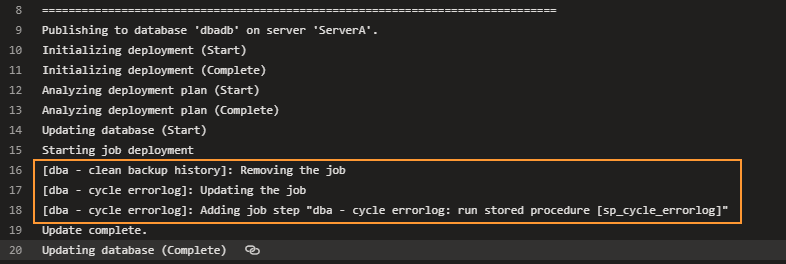
Save changed metadata files and push commit to the Azure DevOps repo. This will trigger the pipeline again. This time it removes the backup history cleanup job and updates another one by re-creating the modified job step:
SSMS confirms removal of the job that has deployment mode “Drop”:

The other survived job has adjusted job step :
The source code
The database project and pipeline code can also be found in my repo avolok / azdo-sql-server-dba
Final words
This post is about a non-trivial topic – how to setup continuous delivery of the SQL Agent Jobs and how to update jobs by keeping their customized settings, schedules, and history data.
Firstly, It touches on various approaches and their strong and weak sides. Then it Illustrates the metadata-driven delivery of the jobs and provides a source code of the deployment logic. And finally, it demonstrates continuous delivery by showing how the pipeline brings new jobs and then updates/removes them.